Contents Of:
| Product | Version |
|---|---|
| Bitbucket Server | 5.7.1 |
| OS | Windows 2012 / CentOS 7 |
I.Windows Service
Bitbucket Memory 설정
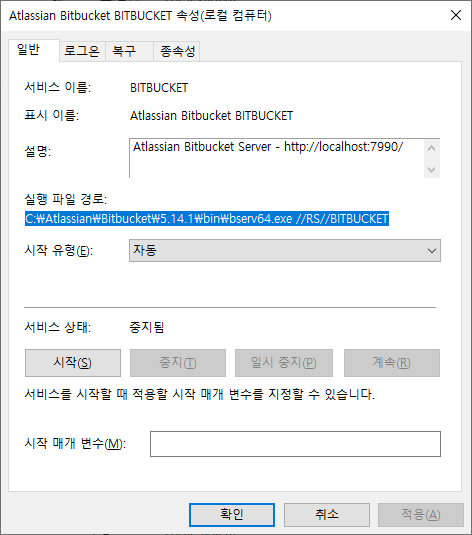
1. 시작 > 실행 > service.msc(윈도우 서비스) 실행 후 Atlassian Bitbucket 서비스 선택, <Bitbucket Installlation-directory> 경로 확인 및 서비스 명 확인(예:BITBUCKET)
2. 시작 > 실행 > cmd(명령 프롬프트) 실행 후 <Bitbucket Installlation-directory> 경로에서 다음 명령어를 입력, AtlassianBitbucket Properties 실행
CMD
C:> cd <bitbucket install dir>/bin
C:\Bitbucket\bin> >bservmgr.exe //ES/<Bitbucket service name>
예)
C:\Bitbucket\bin> >bservmgr.exe //ES/Bitbucket
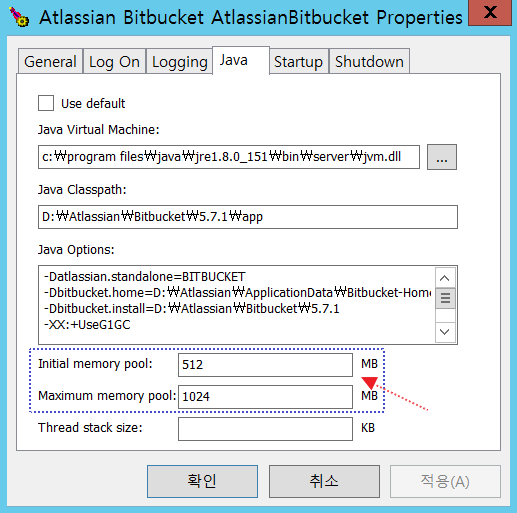
3. Properties 팝업화면에서 JAVA탭 확인
- Initial memory pool 과 Maximum memory pool 사이즈 설정
4. 서비스 재시작
II.Linux
Bitbucket Memory 설정
1.Bitbucket 설치 폴더의 bin 폴더에서 “_start-webapp.sh” 파일 설정 변경
- Ex: bitbucket-5.7.1/bin/_start-webapp.sh
# The following 2 settings control the
minimum and maximum memory allocated to the Java virtual machine.

# For larger instances, the maximum
amount will need to be increased.
#
if [ -z "${JVM_MINIMUM_MEMORY}" ]; then
JVM_MINIMUM_MEMORY=512m
fi
if [ -z "${JVM_MAXIMUM_MEMORY}" ]; then
    JVM_MAXIMUM_MEMORY=1g
2.서비스 재시작