이 문서는 Jira Script Runner 활용하여 HTML 메일 보내기 가이드를 공유하기 위해 작성되었다.
| 도구명 | Jira, Script Runner |
|---|---|
| 비고 |
메일 서버 설정이 되어있어야 메일 보내기가 가능
Worflow Action 시 HTML 메일 보내기
메일 템플릿 만들기
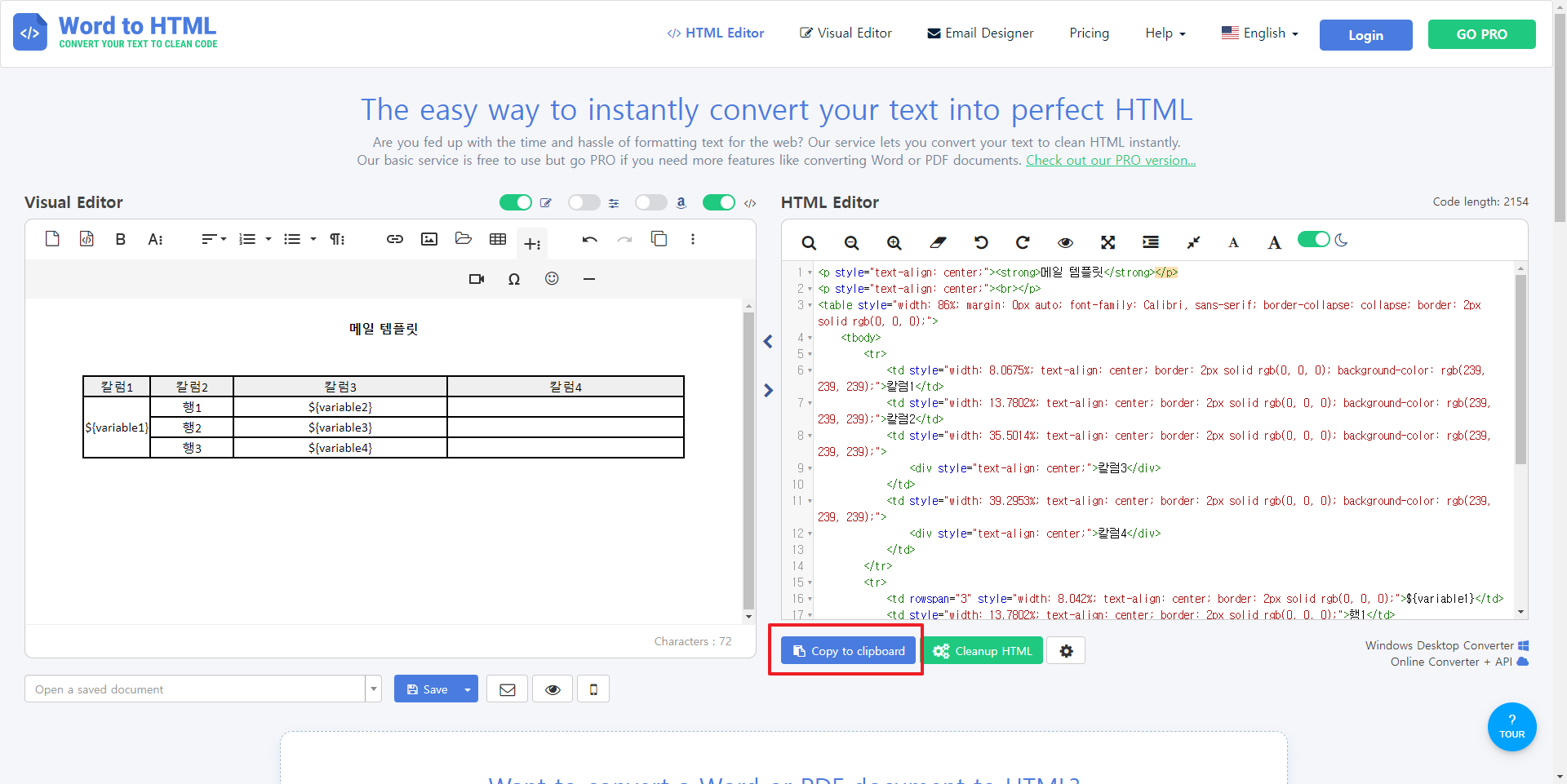
- https://wordtohtml.net/ 접속 후 원하는 형식의 메일 템플릿을 작성 후 HTML Editor 부분을 따로 저장한다.
- 변수를 사용하려면 해당 변수자리에
${변수명}을 넣는다.
Script Runner Workflow Action 만들기
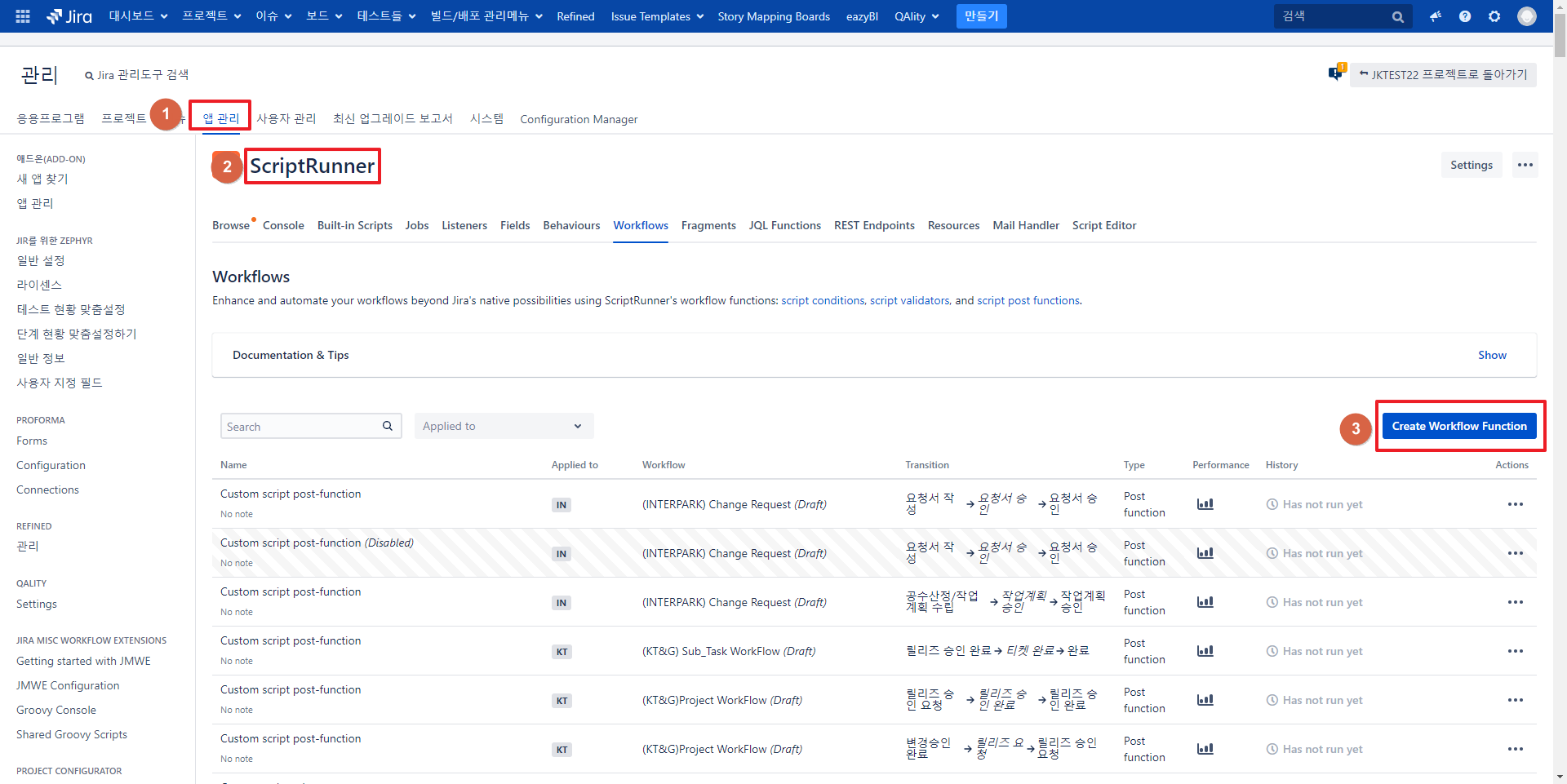
- 시스템 → 앱 관리 → Script Runner → Workflow → Create Workflow functions 선택
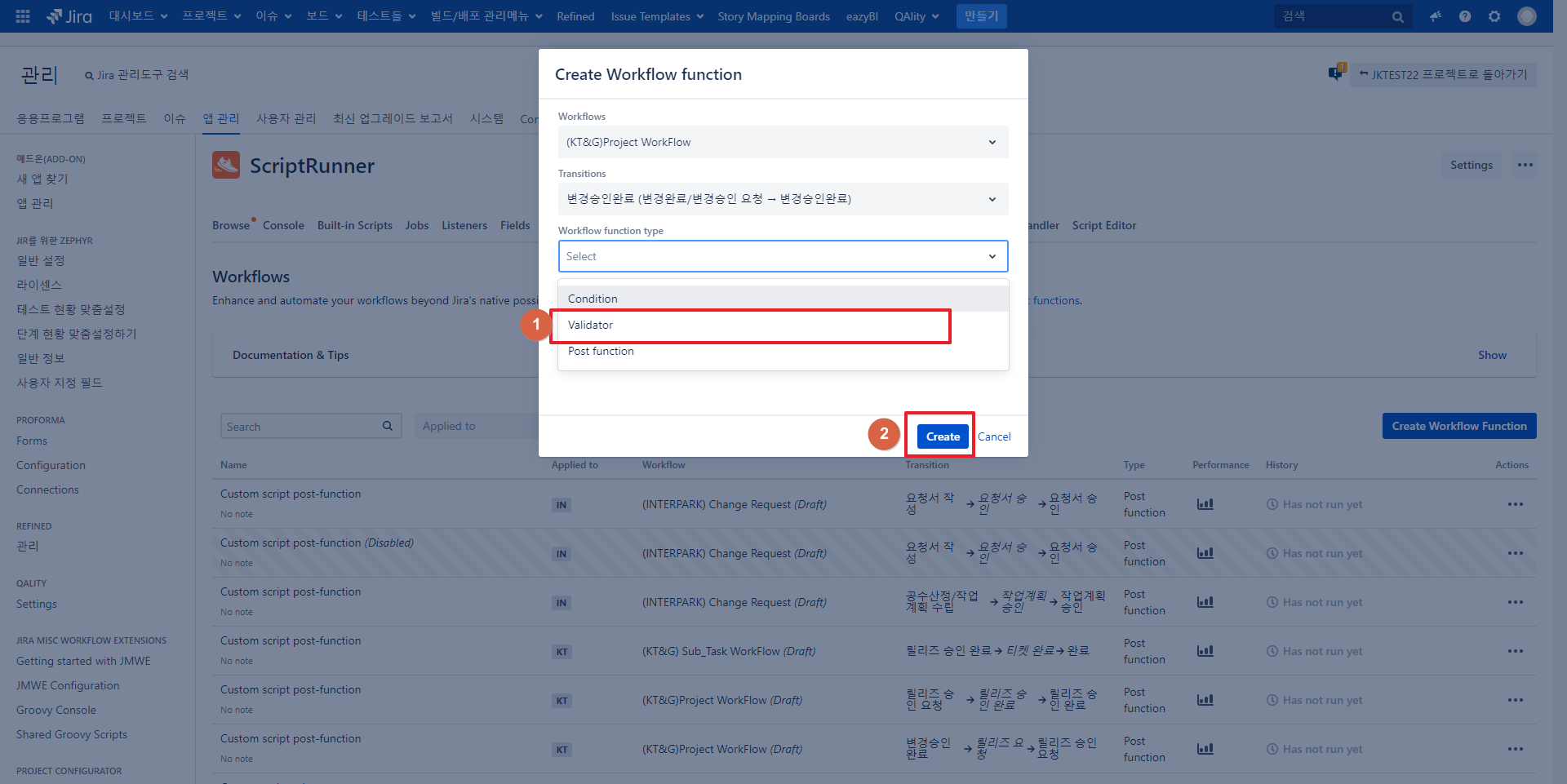
- 해당하는 Workflow와 Transition 선택 후 Validator 선택 후 Create
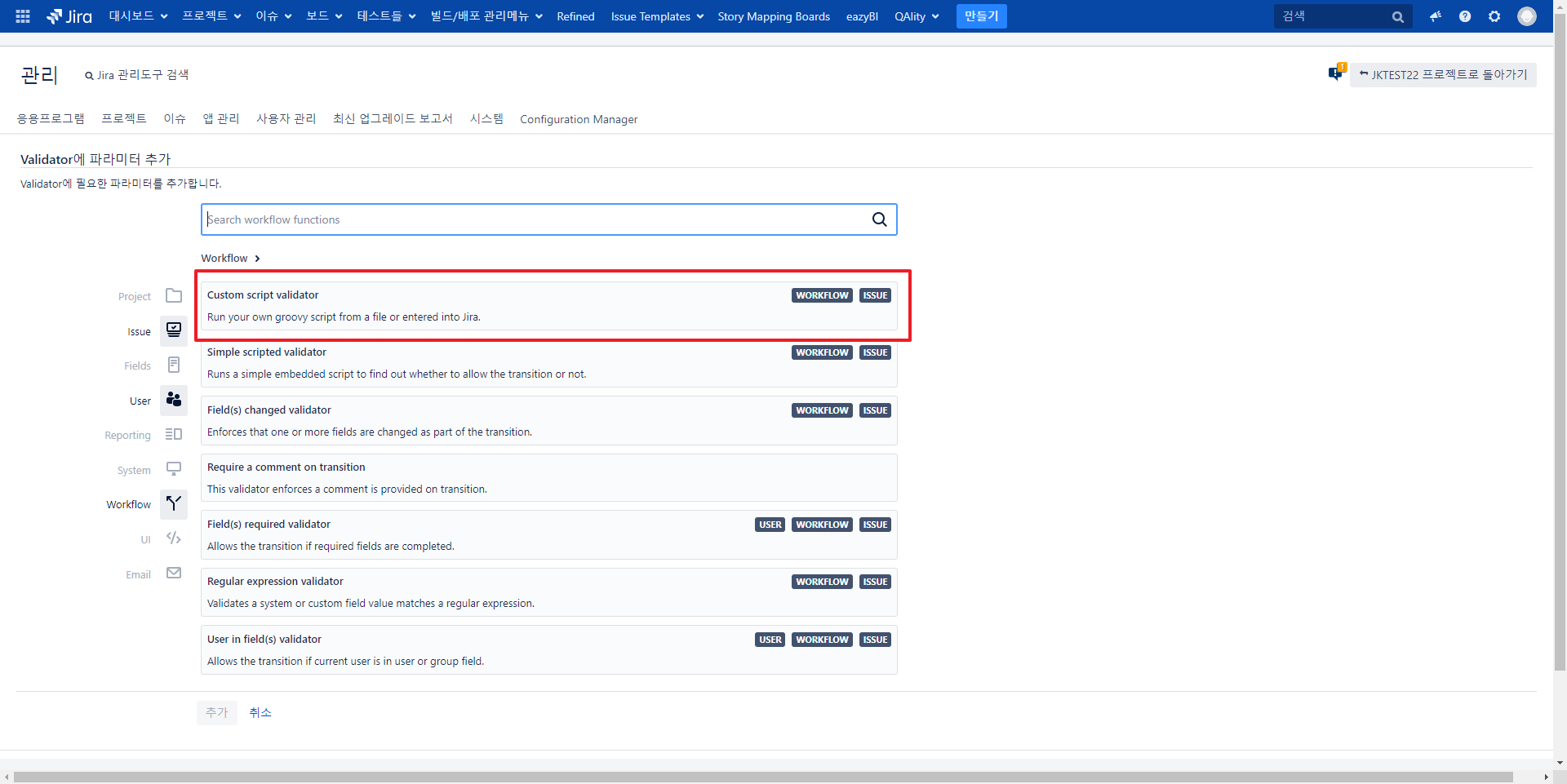
- Custom script validator 선택
Script 내용
Html 전체 글자수가 65535 이하인 경우
import com.atlassian.jira.component.ComponentAccessor
import com.atlassian.jira.mail.Email
import com.atlassian.jira.mail.settings.MailSettings
import com.atlassian.mail.MailException
import com.atlassian.mail.server.SMTPMailServer
import com.atlassian.plugin.util.ContextClassLoaderSwitchingUtil
import org.apache.log4j.Level
import org.apache.log4j.Logger
import com.opensymphony.workflow.InvalidInputException

def issueManager = ComponentAccessor.getIssueManager()
// 이슈 Summary
def summaryfield = issue.getSummary()
// 그외 사용 할 변수 들
def variable1 = "칼럼1 변수"
def variable2 = "행1 변수"
def variable3 = "행2 변수"
def variable4 = "행3 변수"

// HTML 복사한 값 넣기
def body = """
<p style="text-align: center;"><strong>메일 템플릿</strong></p>
<p style="text-align: center;"><br></p>
<table style="width: 86%; margin: 0px auto; font-family: Calibri, sans-serif; border-collapse: collapse; border: 2px solid rgb(0, 0, 0);">
    <tbody>
        <tr>
            <td style="width: 8.0675%; text-align: center; border: 2px solid rgb(0, 0, 0); background-color: rgb(239, 239, 239);">칼럼1</td>
            <td style="width: 13.7802%; text-align: center; border: 2px solid rgb(0, 0, 0); background-color: rgb(239, 239, 239);">칼럼2</td>
            <td style="width: 35.5014%; text-align: center; border: 2px solid rgb(0, 0, 0); background-color: rgb(239, 239, 239);">
                <div style="text-align: center;">칼럼3</div>
            </td>
            <td style="width: 39.2953%; text-align: center; border: 2px solid rgb(0, 0, 0); background-color: rgb(239, 239, 239);">
                <div style="text-align: center;">칼럼4</div>
            </td>
        </tr>
        <tr>
            <td rowspan="3" style="width: 8.042%; text-align: center; border: 2px solid rgb(0, 0, 0);">${variable1}</td>
            <td style="width: 13.7802%; text-align: center; border: 2px solid rgb(0, 0, 0);">행1</td>
            <td style="width: 35.5014%; text-align: center; border: 2px solid rgb(0, 0, 0);">${variable2}</td>
            <td style="width: 39.2953%; text-align: center; border: 2px solid rgb(0, 0, 0);"><br></td>
        </tr>
        <tr>
            <td style="width: 13.7802%; text-align: center; border: 2px solid rgb(0, 0, 0);">행2</td>
            <td style="width: 35.5014%; text-align: center; border: 2px solid rgb(0, 0, 0);">${variable3}</td>
            <td style="width: 39.2953%; text-align: center; border: 2px solid rgb(0, 0, 0);"><br></td>
        </tr>
        <tr>
            <td style="width: 13.7802%; text-align: center; border: 2px solid rgb(0, 0, 0);">행3</td>
            <td style="width: 35.5014%; text-align: center; border: 2px solid rgb(0, 0, 0);">${variable4}</td>
            <td style="width: 39.2953%; text-align: center; border: 2px solid rgb(0, 0, 0);"><br></td>
        </tr>
    </tbody>
</table>
<p><br></p> """

//메일 받는 사람 설정(현재는 해당 이슈 담당자로 설정)
def userManager = ComponentAccessor.getUserManager()
def user = issue.getAssignee()

//기본 메일 주소 설정, 담당자 없을 시 보고자로 설정
if(user == null) {
    user = issue.getReporter()
}
def receiver = user.getEmailAddress()

// 메일주소, 메일 제목, 내용
sendEmail(receiver.toString(), summary ,body)


// 메일보내기 함수
String sendEmail(String emailAddr, String subject, String body) {
    def logger = Logger.getLogger(getClass())
    logger.setLevel(Level.DEBUG)

    // Stop emails being sent if the outgoing mail server gets disabled (useful if you start a script sending emails and need to stop it)
    def mailSettings = ComponentAccessor.getComponent(MailSettings)
    if (mailSettings?.send()?.disabled) {
	 	logger.debug("메일 서버가 비활성 상태입니다.")
        throw new InvalidInputException("메일 서버가 비활성 상태입니다.")
    }

    def mailServer = ComponentAccessor.mailServerManager.defaultSMTPMailServer
    if (!mailServer) {
        logger.debug("메일 서버가 설정되지 않았습니다.")
        throw new InvalidInputException("메일 서버가 설정되지 않았습니다.")
    }

    def email = new Email(emailAddr)
    email.setMimeType('text/html')
    email.setSubject(subject)
    email.setBody(body)
    try {
        // This is needed to avoid the exception about IMAPProvider
        ContextClassLoaderSwitchingUtil.runInContext(SMTPMailServer.classLoader) {
            mailServer.send(email)
        }
        logger.debug('Mail sent')
    } catch (MailException e) {
        logger.debug("Send mail failed with error: ${e.message}")
        throw new InvalidInputException("메일 보내기에 실패했습니다.")
    }
}
Html 전체 글자수가 65535 이상인 경우
- HTML 내용이 큰 경우 위의 방법으로 진행 시 에러가 발생

- 방법 1: 에러를 방지하기 위해 해당 HTML을 파일로 저장 후 사용 - 파일에서 읽을 때 변수가 치환되지 않아
replace를 사용하여 변수를 치환
import com.atlassian.jira.component.ComponentAccessor
import com.atlassian.jira.mail.Email
import com.atlassian.jira.mail.settings.MailSettings
import com.atlassian.mail.MailException
import com.atlassian.mail.server.SMTPMailServer
import com.atlassian.plugin.util.ContextClassLoaderSwitchingUtil
import org.apache.log4j.Level
import org.apache.log4j.Logger
import com.opensymphony.workflow.InvalidInputException

def issueManager = ComponentAccessor.getIssueManager()
// 이슈 Summary
def summaryfield = issue.getSummary()
// 그외 사용 할 변수 들
def variable1 = "칼럼1 변수"
def variable2 = "행1 변수"
def variable3 = "행2 변수"
def variable4 = "행3 변수"

// HTML 저장한 파일 경로 입력
def body = new File('/atlassian/application-data/jira-home/scripts/jktest.groovy').text
// 해당 변수들 replace로 변환
body = body.replace('${variable1}', "칼럼1 변수")
body = body.replace('${variable2}', "행1 변수")
body = body.replace('${variable3}', "행2 변수")
body = body.replace('${variable4}', "행3 변수")

//메일 받는 사람 설정(현재는 해당 이슈 담당자로 설정)
def userManager = ComponentAccessor.getUserManager()
def user = issue.getAssignee()

//기본 메일 주소 설정, 담당자 없을 시 보고자로 설정
if(user == null) {
    user = issue.getReporter()
}
def receiver = user.getEmailAddress()

// 메일주소, 메일 제목, 내용
sendEmail(receiver.toString(), summary ,body)


// 메일보내기 함수
String sendEmail(String emailAddr, String subject, String body) {
    def logger = Logger.getLogger(getClass())
    logger.setLevel(Level.DEBUG)

    // Stop emails being sent if the outgoing mail server gets disabled (useful if you start a script sending emails and need to stop it)
    def mailSettings = ComponentAccessor.getComponent(MailSettings)
    if (mailSettings?.send()?.disabled) {
	 	logger.debug("메일 서버가 비활성 상태입니다.")
        throw new InvalidInputException("메일 서버가 비활성 상태입니다.")
    }

    def mailServer = ComponentAccessor.mailServerManager.defaultSMTPMailServer
    if (!mailServer) {
        logger.debug("메일 서버가 설정되지 않았습니다.")
        throw new InvalidInputException("메일 서버가 설정되지 않았습니다.")
    }

    def email = new Email(emailAddr)
    email.setMimeType('text/html')
    email.setSubject(subject)
    email.setBody(body)
    try {
        // This is needed to avoid the exception about IMAPProvider
        ContextClassLoaderSwitchingUtil.runInContext(SMTPMailServer.classLoader) {
            mailServer.send(email)
        }
        logger.debug('Mail sent')
    } catch (MailException e) {
        logger.debug("Send mail failed with error: ${e.message}")
        throw new InvalidInputException("메일 보내기에 실패했습니다.")
    }
}
- 방법 2: body를 분할하여 저장
import com.atlassian.jira.component.ComponentAccessor
import com.atlassian.jira.mail.Email
import com.atlassian.jira.mail.settings.MailSettings
import com.atlassian.mail.MailException
import com.atlassian.mail.server.SMTPMailServer
import com.atlassian.plugin.util.ContextClassLoaderSwitchingUtil
import org.apache.log4j.Level
import org.apache.log4j.Logger
import com.opensymphony.workflow.InvalidInputException

def issueManager = ComponentAccessor.getIssueManager()
// 이슈 Summary
def summaryfield = issue.getSummary()
// 그외 사용 할 변수 들
def variable1 = "칼럼1 변수"
def variable2 = "행1 변수"
def variable3 = "행2 변수"
def variable4 = "행3 변수"

// HTML 복사한 값 넣기
def body1 = """
<p style="text-align: center;"><strong>메일 템플릿</strong></p>
<p style="text-align: center;"><br></p>
<table style="width: 86%; margin: 0px auto; font-family: Calibri, sans-serif; border-collapse: collapse; border: 2px solid rgb(0, 0, 0);">
    <tbody>
        <tr>
            <td style="width: 8.0675%; text-align: center; border: 2px solid rgb(0, 0, 0); background-color: rgb(239, 239, 239);">칼럼1</td>
            <td style="width: 13.7802%; text-align: center; border: 2px solid rgb(0, 0, 0); background-color: rgb(239, 239, 239);">칼럼2</td>
            <td style="width: 35.5014%; text-align: center; border: 2px solid rgb(0, 0, 0); background-color: rgb(239, 239, 239);">
                <div style="text-align: center;">칼럼3</div>
            </td>
            <td style="width: 39.2953%; text-align: center; border: 2px solid rgb(0, 0, 0); background-color: rgb(239, 239, 239);">
                <div style="text-align: center;">칼럼4</div>
            </td>
        </tr>
"""
def body2 = """
         <tr>
            <td rowspan="3" style="width: 8.042%; text-align: center; border: 2px solid rgb(0, 0, 0);">${variable1}</td>
            <td style="width: 13.7802%; text-align: center; border: 2px solid rgb(0, 0, 0);">행1</td>
            <td style="width: 35.5014%; text-align: center; border: 2px solid rgb(0, 0, 0);">${variable2}</td>
            <td style="width: 39.2953%; text-align: center; border: 2px solid rgb(0, 0, 0);"><br></td>
        </tr>
        <tr>
            <td style="width: 13.7802%; text-align: center; border: 2px solid rgb(0, 0, 0);">행2</td>
            <td style="width: 35.5014%; text-align: center; border: 2px solid rgb(0, 0, 0);">${variable3}</td>
            <td style="width: 39.2953%; text-align: center; border: 2px solid rgb(0, 0, 0);"><br></td>
        </tr>
        <tr>
            <td style="width: 13.7802%; text-align: center; border: 2px solid rgb(0, 0, 0);">행3</td>
            <td style="width: 35.5014%; text-align: center; border: 2px solid rgb(0, 0, 0);">${variable4}</td>
            <td style="width: 39.2953%; text-align: center; border: 2px solid rgb(0, 0, 0);"><br></td>
        </tr>
    </tbody>
</table>
<p><br></p>
"""
def body = body1 + body2

//메일 받는 사람 설정(현재는 해당 이슈 담당자로 설정)
def userManager = ComponentAccessor.getUserManager()
def user = issue.getAssignee()

//기본 메일 주소 설정, 담당자 없을 시 보고자로 설정
if(user == null) {
    user = issue.getReporter()
}
def receiver = user.getEmailAddress()

// 메일주소, 메일 제목, 내용
sendEmail(receiver.toString(), summary ,body)


// 메일보내기 함수
String sendEmail(String emailAddr, String subject, String body) {
    def logger = Logger.getLogger(getClass())
    logger.setLevel(Level.DEBUG)

    // Stop emails being sent if the outgoing mail server gets disabled (useful if you start a script sending emails and need to stop it)
    def mailSettings = ComponentAccessor.getComponent(MailSettings)
    if (mailSettings?.send()?.disabled) {
	 	logger.debug("메일 서버가 비활성 상태입니다.")
        throw new InvalidInputException("메일 서버가 비활성 상태입니다.")
    }

    def mailServer = ComponentAccessor.mailServerManager.defaultSMTPMailServer
    if (!mailServer) {
        logger.debug("메일 서버가 설정되지 않았습니다.")
        throw new InvalidInputException("메일 서버가 설정되지 않았습니다.")
    }

    def email = new Email(emailAddr)
    email.setMimeType('text/html')
    email.setSubject(subject)
    email.setBody(body)
    try {
        // This is needed to avoid the exception about IMAPProvider
        ContextClassLoaderSwitchingUtil.runInContext(SMTPMailServer.classLoader) {
            mailServer.send(email)
        }
        logger.debug('Mail sent')
    } catch (MailException e) {
        logger.debug("Send mail failed with error: ${e.message}")
        throw new InvalidInputException("메일 보내기에 실패했습니다.")
    }
}